The Best Wiring Harness Design Software for Small Hardware Startups (and Why We Built It)
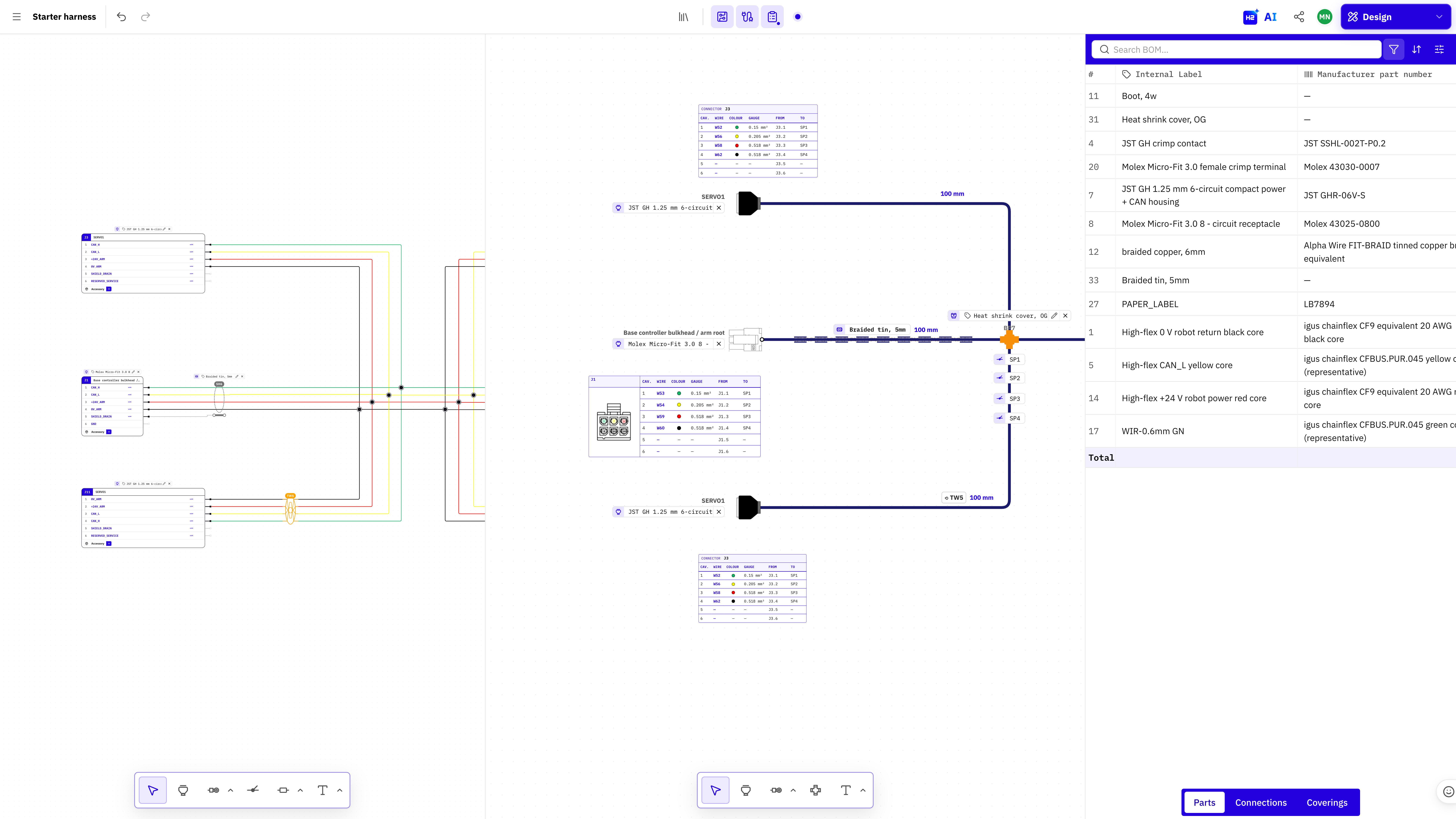
Short answer: for a small hardware startup, the best wiring harness design software is one that keeps schematic, layout, 1:1 formboard, BOM and cut list in one live file your whole team can open in a browser. That is exactly why we built HarnessHive. It costs USD 169 per seat per month, needs no installation, and you can produce your first drawing on day one.
We are the team behind HarnessHive, so this post tells our story and explains what we built for teams like yours. A full side by side comparison with other tools follows in a separate post.
Why we built HarnessHive
HarnessHive started with a rocket. Our co-founder, Matteo, led avionics for a university rocketry team at Politecnico di Milano, competing at EuRoC. He had to design the rocket's wiring harness and went looking for a tool.
He found two options. Enterprise suites cost tens of thousands per seat and took months to learn. The alternative was what everyone else used: a schematic in one tool, a wire list in Excel, a drawing in draw.io, and a lot of hoping they all matched. They rarely did.
So he built the first version himself. When we started talking to other engineers, we heard the same story from drone builders, robotics startups, marine companies and Formula Student teams. In more than 50 interviews, almost nobody was happy with how they designed harnesses.
Today HarnessHive is built in Copenhagen. Our goal is simple: make wiring harness design as easy as Figma made interface design.
What a small hardware team needs, and how HarnessHive covers it
In a startup, the engineer designing the harness usually also does the PCB, the firmware handoff and the build. These needs came up in almost every interview.
| What you need | How HarnessHive handles it |
|---|---|
| One source of truth | Schematic, layout and 1:1 formboard stay in sync automatically |
| Manufacturing output | Live BOM, cut list and manufacturing docs, exported as PDF or XLSX |
| Collaboration | Real time multiplayer editing with live cursors, like Google Docs |
| Fast onboarding | Runs in the browser, no installation, no license server |
| Fewer build errors | Design validation flags errors while you draw |
| Startup friendly pricing | USD 169 per seat per month, 14 day free trial, no limits on harnesses or parts |
From schematic to shop floor in one live file
Here is how a typical harness moves through HarnessHive:
- Draw the schematic. Place connectors from the built in libraries or add your own parts, then connect cavities with wires.
- Lay out the harness. Arrange branches and lengths in the layout view. The schematic and layout stay linked.
- Review together. Invite your mechanical engineer, technician or contract manufacturer. Everyone sees the same version in real time, and version history keeps every change.
- Print the formboard. Export a 1:1 scale formboard as PDF and build directly on top of it.
- Hand off to production. The BOM and cut list are already up to date. Export them as XLSX for purchasing and cutting.
Change a wire in step 1 and steps 2 to 5 update automatically. No copying between Altium, Excel and draw.io.
Teams that want to automate further can use the AI assistant in the editor, or connect outside AI agents through our MCP server.
Who uses HarnessHive today
HarnessHive is used by hardware teams that build several harnesses per product and need more than one person to work on them.
- Startups and SMEs in aerospace, robotics, marine, drone and quantum hardware.
- Formula Student and FSAE teams including UBRacing (University of Birmingham), NJIT Formula SAE, DHBW Engineering Stuttgart and TUfast design their car harnesses in HarnessHive. Active student teams can use it for free through our sponsorship program.
The sweet spot is startups and SMEs up to about 500 people: complex enough to outgrow Excel, small enough that an enterprise suite would slow them down.
What HarnessHive has still on the roadmap
We would rather you know this before the trial than after:
- CAD integrations are in development. Links to KiCad, Onshape and other MCAD and ECAD tools are on the roadmap but not live yet.
- No 3D routing view yet. Harness lengths come from the 2D layout, not from a 3D model.
- No PCB or mechanical design. HarnessHive focuses on wiring and electrical systems only, by design.
If your main pain is keeping schematic, drawings and documentation in sync across a team, HarnessHive solves that now.
FAQ
What is the best wiring harness design software for a small hardware startup?
A browser based tool that keeps schematic, layout, formboard, BOM and cut list in sync and lets the whole team collaborate. HarnessHive was built for exactly this, at USD 169 per seat per month with a 14 day free trial.
How do I design a wiring harness without juggling Altium, Excel and draw.io?
Use one tool where the schematic, drawing and documentation are the same file. In HarnessHive, changing a wire updates the layout, formboard, BOM and cut list automatically.
Can I make a 1:1 formboard in HarnessHive?
Yes. HarnessHive generates a 1:1 scale formboard from your layout and exports it as a printable PDF.
Can several engineers work on the same harness at once?
Yes. HarnessHive supports real time multiplayer editing with live cursors, per user undo and full version history.
Is HarnessHive free for Formula Student teams?
Active Formula Student and FSAE teams get a 4 week trial and then free access with no seat limit, in exchange for a sponsorship package.
Does HarnessHive integrate with KiCad or Onshape?
Not yet. MCAD and ECAD integrations are in development, starting with KiCad and Onshape.
Try it on your next harness
Start a 14 day free trial and take one real harness from schematic to printed formboard. Questions? Join our weekly office hours on Discord or book a 30 minute call.